
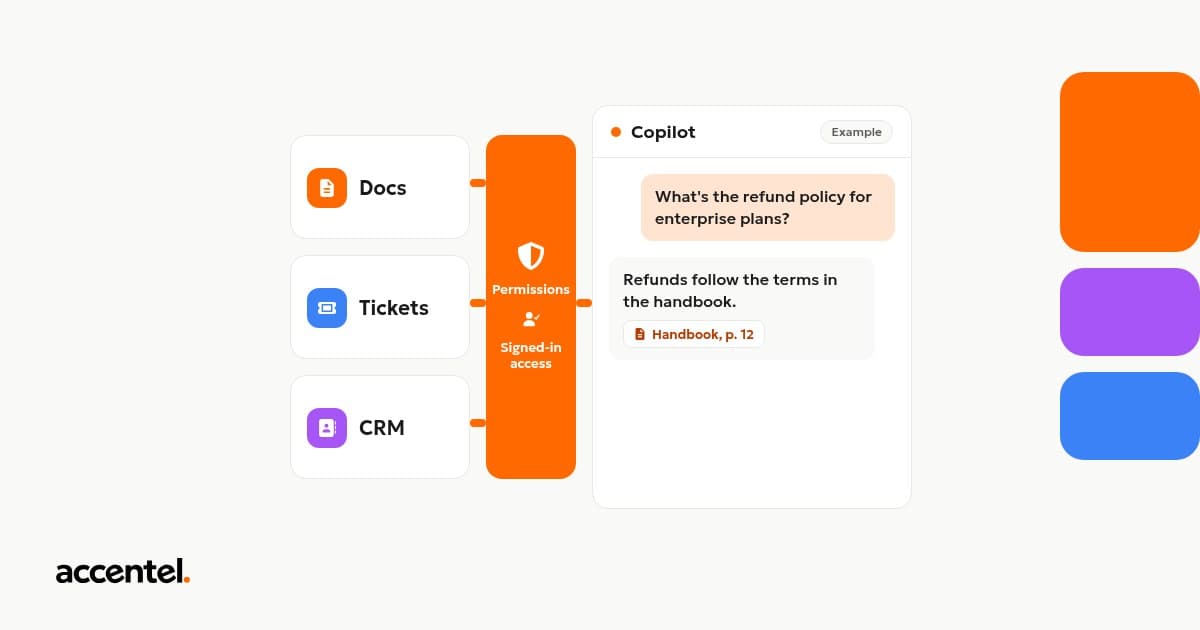
An internal AI copilot is not a chatbot with your logo on it. It is a production system that answers or acts on one workplace workflow, using only the knowledge and tools the signed-in employee is allowed to use, and it is measured against real questions before it is rolled out. Most failed copilots skip scoping, permissions, and evaluation, then wonder why nobody comes back after the demo.
This article walks through a practical path: scope one workflow, prepare knowledge and permissions, retrieve and (optionally) act, put guardrails on writes, evaluate, then pilot. It will not claim Accentel client results. The goal is a copilot employees actually use, not a demo that looks clever for a week.
What is an internal AI copilot, and how is it different from a chatbot?
An internal AI copilot sits in the employee's work: Slack, Microsoft Teams, an intranet, or a line-of-business app. It answers questions from the company's own knowledge, and it may later take actions in systems of record, such as drafting a ticket or proposing a change that a person then approves. A public chatbot or generic assistant is often unauthenticated or only lightly authenticated. It usually has no permission model that matches your directories and file shares, and it should not write to your systems of record.
Off-the-shelf vendor copilots, such as Microsoft 365 Copilot, are a third category. They can be the right first move when the work already lives in that suite and the vendor's governance model is acceptable. Microsoft's own Copilot Studio guidance, for example, treats rollout as a staged program: align IT, security, compliance, and legal early, document data residency and retention, and restrict which knowledge sources an agent may use. Buying is not a lesser option. It is the sensible option when those conditions hold.
A custom enterprise AI copilot is the better fit when the workflow spans systems a vendor copilot cannot reach, such as a CRM, a ticketing tool, internal APIs, and document stores that do not share one permission model, or when data residency, permission enforcement, or evaluation requirements are stricter than a platform default. In both cases, the test is the same: does the system retrieve only what that employee may see, cite its evidence or abstain, and keep a human in the loop before it changes anything that matters?
This piece is about that production bar. It is not a generic chatbot post, and it does not present Accentel project outcomes as proof.
When should you build an enterprise AI copilot?
Use a build, buy, or wait decision, not a preference for custom work. The rows below are qualitative. There is no universal ROI number that makes the choice for you.
- The work already lives in one vendor suite, and that vendor's governance is acceptable. Lean buy or enable the platform copilot. Apply its admin, data-source, and staged-rollout controls. A custom build is usually unnecessary as a first step.
- The workflow crosses a CRM, document stores, ticketing, and internal APIs the vendor cannot reach. Lean custom build, or assemble a copilot around those systems, with the employee's identity carried into every retrieval and tool call.
- Knowledge is messy, permissions are unclear, or no one owns the process. Wait. Fix ownership, source quality, and access rules first. A copilot will amplify whatever is already broken.
- The job is regulated or high-impact, such as legal, clinical, or financial guidance. Lean a tightly governed platform or a custom system, with read-and-recommend behavior and human approval. This is not a weekend prototype.
If you are still deciding whether the organization is ready to pick a first workflow at all, AI strategy and consulting is the right starting point: readiness, ownership, and a build-versus-buy framing before anyone writes a line of retrieval code.
How do you scope the first workflow?
Start narrower than the demo temptation. One team, one job, one success metric you can already measure, such as time-to-answer, handle time, rework, or onboarding time. Record a baseline from current work. Do not invent a target or a baseline you have not measured.
A useful scoping checklist:
- One named team and one workflow, not "company knowledge" in the abstract.
- One success metric with a baseline taken from today's process.
- Explicit non-goals: what the copilot will refuse to do in version 1, written down where builders and reviewers can see them.
- Systems it must read, and systems it must never write to in version 1.
- A named business owner, a knowledge owner, and a security contact, each of whom can make a decision.
- A risk tier. Low might be policy lookup. Medium might be a service-desk draft. High is legal, finance, or clinical guidance. High-risk copilots should be read-and-recommend, with a human in the loop, until the controls below actually exist.
If you cannot name the owner, the metric, or the systems, you are not scoping a copilot. You are planning a demo.
What architecture does a production internal copilot need?
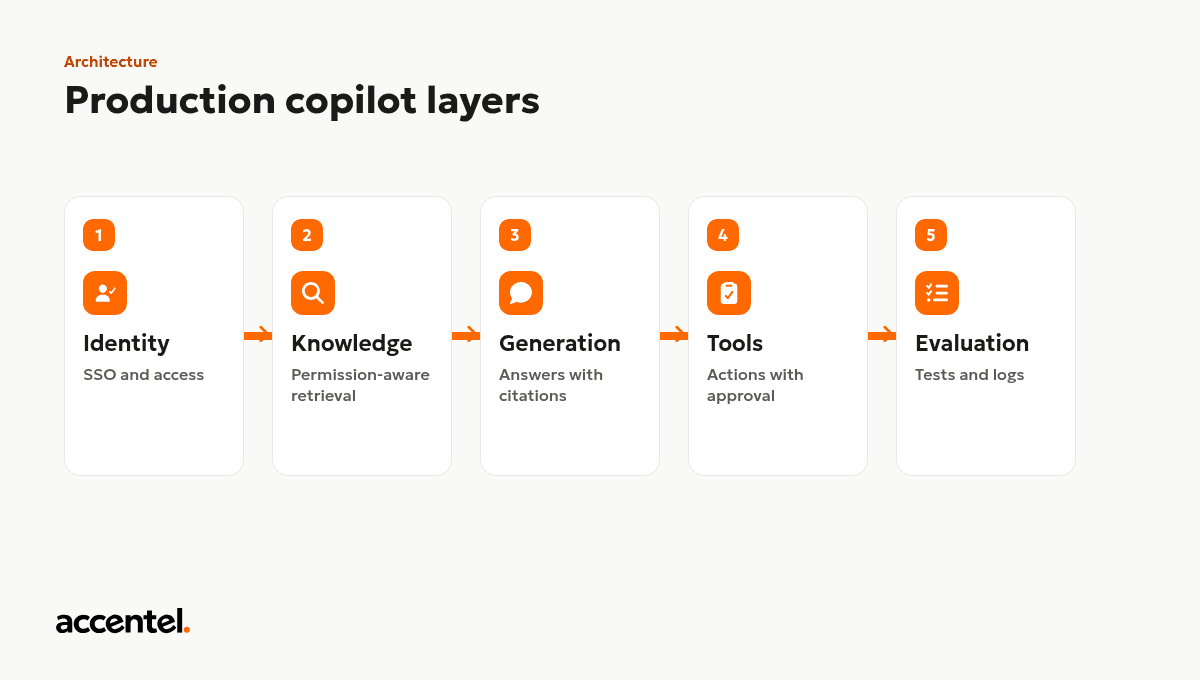
Keep the architecture practical. You do not need a vendor bake-off. You need a few layers that, if skipped, predictably fail.
- Identity and access. Every request runs as the signed-in employee, typically through SSO. If you skip this, answers or actions leak across teams.
- Knowledge and retrieval. Permission-aware search over approved sources. If you skip this, you get hallucinations, stale policy, and oversharing.
- Generation. Answer only from retrieved evidence, with citations, or abstain. If you skip this, you get fluent, ungrounded advice.
- Tools and actions. Least privilege, an allowlist, and human approval for writes. If you skip this, a wrong ticket, refund, or access change can go out.
- Evaluation and logs. Golden questions, quality and cost tracking, and an audit trail. If you skip this, you cannot tell whether the system works, and you cannot investigate an incident.
AWS's prescriptive guidance on retrieval-augmented generation describes the basic RAG pattern in four steps: you ingest and index internal documents once, a person asks a question, an orchestrator retrieves relevant context and adds it to the prompt, and the model writes an answer using that context. The same guide is clear that a production system also needs connectors, guardrails, an orchestrator, and fine-grained identity and access management. Retrieval is necessary. It is not the whole design.
Permission-aware retrieval
Filter by the caller's access before documents reach the model. Post-filtering after generation is not enough, because the model may already have seen restricted text, and that text can leak through the answer, a tool call, or a log.
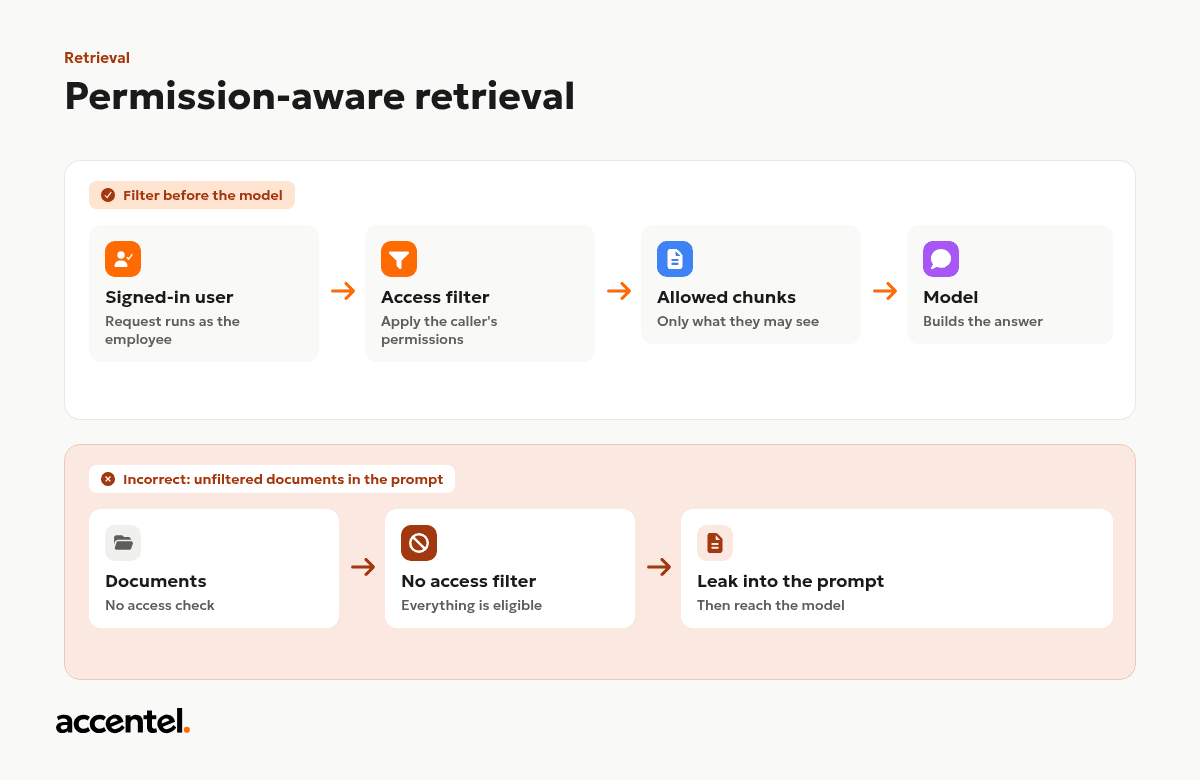
Microsoft's overview of enterprise AI search states this directly: configured authorization controls must prevent restricted content from reaching an unauthorized caller or the model generating their answer. The application must authenticate the caller and enforce source permissions before that happens. Microsoft also advises teams to test access changes, missing identity information, and any caches the application uses, and to store source permissions with each indexed chunk as the index stays fresh.
The current OWASP Top 10 for LLM Applications (2026) makes the same design point in two places. Under sensitive information disclosure, it tells teams to authorize before retrieval, at document- and chunk-level inside the index query, not at the application layer after retrieval, because post-generation filtering cannot undo a chunk already supplied to the model. Under vector and embedding weaknesses, it warns that similarity search often runs across a full index before access control is applied, and it tells teams to enforce tenant or user scoping inside the index query, not as a post-retrieval filter.
This is the core of production RAG and knowledge systems: approved sources, permission-aware retrieval, and a design that does not treat "the user can open the file in another app" as a reason to show it in a copilot answer without the same check.
Citations and abstention
If the evidence is not in the retrieved context, the copilot should say it does not know. Microsoft's enterprise AI search guidance is useful here too: an answer can sound confident while containing unsupported statements; a citation only helps if the cited source actually supports the claim; and the application should define what to do when evidence is missing or contradictory. Evaluate whether retrieval found the necessary evidence, then whether the written answer is supported by that evidence. Those are two different tests.
Read versus act
Version 1 should usually be read-only: answer with citations, or abstain. Write actions need an allowlist of tools, schema validation on arguments, idempotency so a retried request does not double-apply a change, and a human approve step before anything is committed.
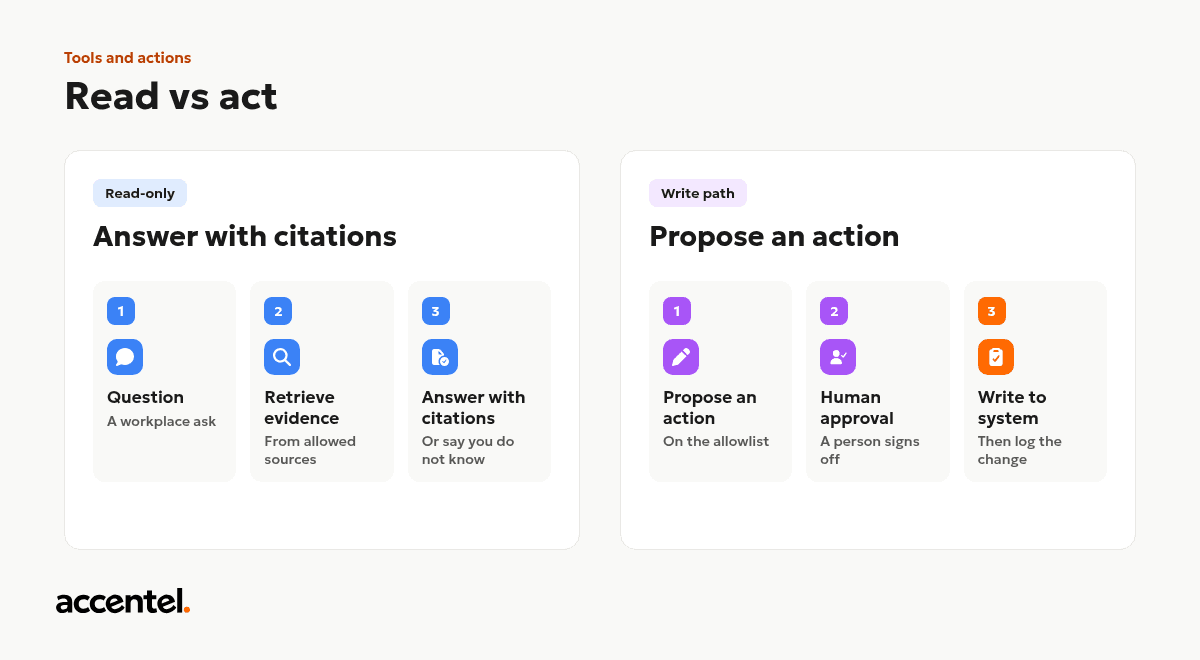
When the copilot starts taking actions in a workflow, that is process automation with a human still in the loop, not a model with unchecked access to your systems of record. OWASP's 2026 entry on excessive agency is the right warning: damage often comes from excessive functionality, excessive permissions, or excessive autonomy, and high-impact actions should require a person to approve them. Tools should run in the signed-in user's context, with the minimum privilege required, rather than a shared service account that can see or change everyone else's data.
Model hosting
Choose hosting for data residency, contractual terms, and operational control, not for a leaderboard score. There is no single best model for every internal copilot. The usual categories are managed enterprise APIs, such as Azure OpenAI, Amazon Bedrock, or Google Vertex AI, and open-weight models running in your VPC or on-premises environment. The question is where prompts, retrieved chunks, and logs may live, and who can retain them.
You do not need custom LLM development to launch an internal copilot. A hosted or self-hosted base model plus permission-aware retrieval is enough for many first workflows. A custom or fine-tuned model becomes relevant later, when domain language, on-premises constraints, or evaluation results show that retrieval alone is not meeting the bar.
If the copilot itself is the product, a sidebar in Slack or Teams, or a custom internal app, that packaging is a full-stack AI application: identity in the interface, the retrieval and tool layers behind it, and production monitoring around both.
How should you evaluate the copilot before anyone demos it?
Build a golden set of real questions from the target team, taken from actual work, not from a marketing script. Include ordinary questions, messy ones, and questions the user should not be able to answer because of permissions. Include cases with conflicting sources or not enough evidence, which is also what Microsoft recommends when teams test enterprise AI search.
Score at least four things:
- Correctness of the answer for that workflow.
- Citation support: the cited passage actually backs the claim.
- Appropriate refusal: the copilot abstains when it should.
- Permission failures: a correct answer drawn from unauthorized content is a security defect, not a quality win.
Evaluate retrieval and generation separately. If the right document never arrived, fixing the prompt will not help. If the document arrived and the answer still invented a clause, that is a generation problem.
After launch, track quality, latency, cost per completed task, user feedback, and security events. Do not copy someone else's service-level numbers. Set thresholds that match the workflow. As a qualitative guide, the first token of an answer should feel interactive enough that people stay with the task, and a multi-step action should have a time and cost budget you are willing to stand behind. You choose those numbers; this article will not invent them for you.
What security and governance problems are unique to copilots?
Internal copilots fail in ways a standard web app does not, because the model can read broadly, write fluently, and, if you allow it, call tools. The current OWASP Top 10 for LLM Applications (2026) is a practical backbone for the issues below. It is a risk list, not a certification.
Inherited oversharing. The copilot can find any file the user can technically open, including stale shares, over-broad drive permissions, and documents no one would have emailed to a wide audience. OWASP describes this as oversharing upstream: unscoped drives and legacy permissions feed retrieval, and the model then retrieves that content as designed. The fix is the data surface and authorization at query time, not a friendlier system prompt.
Prompt injection via retrieved documents. OWASP's 2026 prompt-injection entry covers input that arrives as retrieved content, tool output, or persistent memory, not only as a typed user prompt. Models do not make a clean architectural distinction between instructions and data. A poisoned policy PDF, ticket, or email can alter behavior, including tool use. Treat retrieved text as untrusted input, constrain what tools the model may call, and require a human to approve high-impact actions.
Sensitive data in logs and traces. The same OWASP list treats prompts, retrieved chunks, tool arguments, reasoning traces, and telemetry as disclosure surfaces. A sanitized answer in the UI is not enough if the trace still holds a medical record or a contract clause in your observability tool.
Unmanaged tool sprawl. Excessive agency appears when leftover tools stay connected, a "read" integration can also delete or send, or a shared service account is used instead of the employee's identity. Minimize tools, tighten permissions, and do not let the model be the last authority on whether an action is allowed.
No audit trail. If you cannot reconstruct who asked, what was retrieved, what the model proposed, and who approved a write, you cannot investigate an incident or improve the golden set.
For a governance frame, use the NIST AI Risk Management Framework. NIST states that the AI RMF is intended for voluntary use. Its core is four functions: Govern, Map, Measure, and Manage. NIST is explicit that the actions under those functions are not a checklist and need not be applied as an ordered set of steps. The companion Generative AI Profile (NIST AI 600-1) is a cross-sector profile of that same framework. It offers a menu of risks and suggested actions so organizations can choose what aligns with their goals, requirements, and risk tolerance. It is not a badge, and using it does not mean a product has "passed NIST."
Among the risks NIST flags as unique to or worsened by generative AI are confabulation (confident but false content), data privacy, information security, and human-AI configuration, including over-reliance. Those map cleanly to copilots: fluent wrong answers, sensitive chunks in context or logs, tools that can be misused, and people clicking "approve" because the answer sounded sure.
What does a safe rollout look like?
Keep the first rollout as disciplined as the first scope. This is a sequence, not an Accentel timeline or a promised number of weeks.
1. Run a shadow or limited pilot with a named champion from the target team. 2. Compare the copilot against the baseline you recorded during scoping. 3. Fix the top failure patterns: missed retrieval, unsupported answers, bad refusals, and permission defects. 4. Expand to the next team only after the quality and permission tests still pass. 5. Keep a manual fallback if the model or provider is down, so the workflow does not disappear with an outage.
Vendor copilots should be rolled out with the same seriousness. Microsoft's Copilot Studio governance guide is organized in phases, starting with discovery and planning, for that reason. Whether you buy, assemble, or build, a staged pilot with a fallback is safer than a company-wide launch from a demo.
FAQ
Do we need to train our own model to launch an internal copilot?
No. Many first copilots use a managed or self-hosted base model plus retrieval over a curated, permission-aware knowledge base. Train or fine-tune a custom model when evaluation shows that retrieval and prompting cannot meet the accuracy, language, or deployment constraints of the workflow.
Is RAG enough, or do we need agents and tool calling?
RAG is enough when the job is to answer from approved documents, with citations and abstention. Agents and tool calling become relevant when the copilot must take actions in other systems. Start read-only unless the workflow truly requires a write, and put allowlists, validation, and human approval in front of those writes.
Can we just turn on Microsoft 365 Copilot (or a similar vendor copilot) instead?
Yes, when the work already lives in that suite and you can accept and configure the vendor's governance, data sources, and rollout model. Build or assemble a custom copilot when the workflow spans systems the vendor cannot reach, or when residency, permission enforcement, or evaluation requirements go beyond what the platform gives you.
How do we stop the copilot from answering with documents a user should not see?
Authenticate every request as that employee. Enforce source permissions before retrieval, inside the index or source query, so restricted chunks never reach the model. Do not rely on filtering the answer after the fact. Test access changes, missing identity, and caches, and treat a correct-but-unauthorized answer as a security defect.
What should we measure in the first 30 days?
Use the baseline you already have. Track answer quality, citation support, appropriate refusals, permission failures, latency, cost per completed task, feedback from the pilot team, and security or audit events. Do not declare success from a demo script.
When is Accentel a fit, and when should we use in-house or a platform?
A platform copilot is a fit when the work already lives in that suite and its governance meets your needs. In-house is a fit when you already have the product, security, and evaluation capacity to own the system. Accentel is a fit when you want help scoping the first workflow, designing permission-aware retrieval, or packaging the copilot as an internal application, without skipping evaluation or human approval for actions.
If you have a single internal workflow in mind and want a straight conversation about whether to buy, assemble, or build, email sales@accentel.com. We respond within 24 hours.